
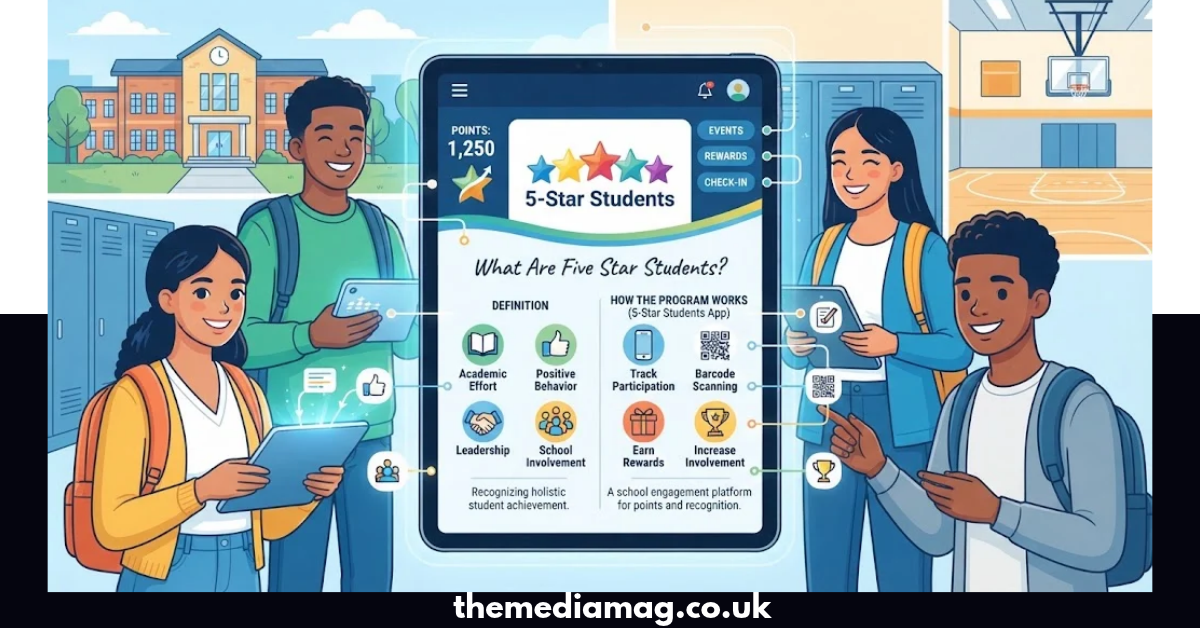
Five star students can mean students who show strong academic effort, positive behavior, leadership, and school involvement. It is also the name commonly used for 5-Star Students, a school engagement platform that helps schools track activities, events, participation, positive behaviors, points, rewards, and student involvement.
The 5-Star Students platform gives schools tools to record participation through mobile apps, barcode scanning, QR codes, and other check-in methods. Students can use the system to view points, activities, events, rewards, school information, and other features enabled by their school.
If your school uses 5-Star Students, your exact point system and available features may be different because schools can customize activities, point values, rewards, and participation rules.
What Is 5-Star Students?
5-Star Students is a student engagement and recognition platform designed for schools. Its main goal is to make it easier for schools to record and encourage student participation.
The system can track activities such as:
- School clubs
- Sports events
- Performances
- School dances
- Student organizations
- Positive behaviors
- Interventions
- Surveys
- School voting
- Special activities
- Other school events
Schools can assign points to selected activities and behaviors. Students can then view their progress and, when their school enables the feature, exchange eligible points for rewards.
How Do Five Star Students Earn Points?
Five star students usually earn points by taking part in activities or showing behaviors that their school has chosen to recognize.
There is no single universal point system. Each school can create its own rules and assign different values to activities.
For example, one school may give points for joining a club, while another may award points for attending a football game, participating in a spirit day, helping another student, or completing an intervention.
A school may also use student ID cards, barcode scanning, QR codes, location-based check-ins, or codes provided at an event to record participation.
Common Ways to Earn Points
| Activity | Possible Recognition |
| Joining a school club | Participation points |
| Attending a school event | Event points |
| Playing in a school sport | Activity points |
| Joining a spirit activity | Participation points |
| Demonstrating positive behavior | Behavior points |
| Academic support | School-defined points |
| Helping with school activities | Participation points |
| Completing eligible surveys | Participation points |
| Attending interventions | Check-in points |
| Showing school leadership | School-defined points |
The exact number of points depends on the school. For example, Eagle Ridge Academy publishes its own point values for clubs, events, special days, and community or integrity activities.
How Does the 5-Star Students App Work?
The 5-Star Students app gives students access to information connected with their school’s 5-Star program.
According to the official app listing, students can view their points, rewards, activities, events, surveys, voting polls, school news, and notifications. The app can also provide a digital student ID and support event check-ins when those features are enabled by the school.
The basic process usually looks like this:
- Download the official 5-Star Students app.
- Select your school or follow your school’s login instructions.
- Sign in using the information provided by your school.
- View available activities and events.
- Participate in eligible activities.
- Check in using the method required by your school.
- Watch your points increase.
- View available rewards when you become eligible.
Not every school enables every feature, so your app may look different from another student’s account.
What Can Students See in the App?
Depending on the school’s setup, students may be able to see:
- Personal points
- Eligible rewards
- Upcoming activities
- School events
- Activity calendars
- Leaderboards
- Digital ID
- School news
- Notifications
- Surveys
- Voting polls
- Hall passes
- Intervention opportunities
The official 5-Star Students feature list confirms that the student app can provide access to personal data, points, eligible rewards, calendars, leaderboards, activities, interventions, surveys, voting polls, and digital identification.
What Rewards Can Five Star Students Receive?
Five star students may receive rewards when they collect enough points, but rewards depend completely on the individual school’s program.
Possible rewards can include:
- School merchandise
- Event benefits
- Tickets
- Special recognition
- Student-store items
- Raffle entries
- School privileges
- Other incentives selected by administrators
The platform allows schools to create rewards, add descriptions and instructions, manage inventory, and set redemption options.
This means students should not assume that a particular reward is available at every school.
Example Reward Structure
A school could create a system like this:
| Points | Example Reward |
| 25 | Small school item |
| 50 | Snack or school merchandise |
| 100 | Event-related reward |
| 200 | Premium school item |
| 500 | Special recognition |
| 1,000 | Major school incentive |
These numbers are only examples. Your school’s actual rewards and point requirements may be completely different.
How Do School Events Get Tracked?
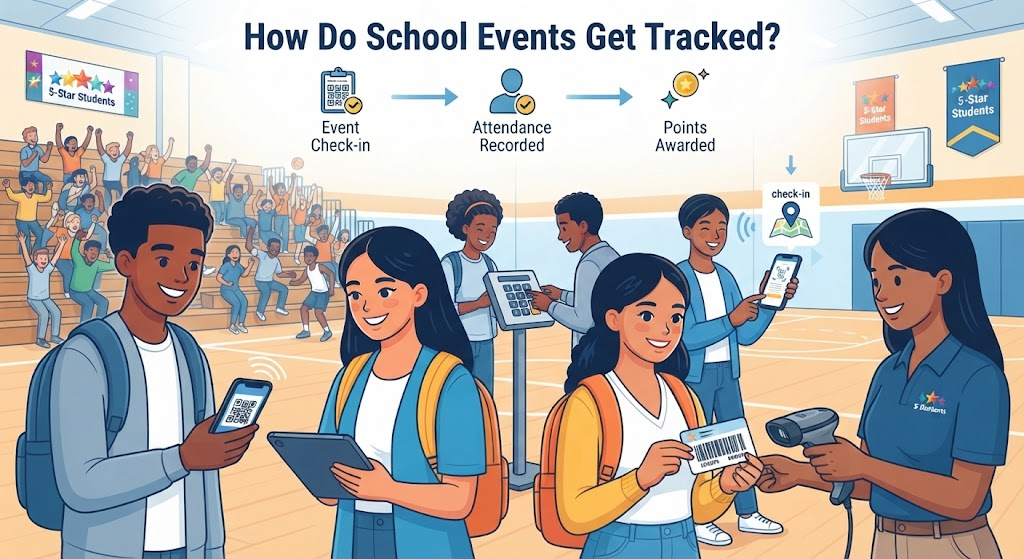
Schools can use 5-Star Students to record attendance at many types of events.
The official platform supports attendance through barcode scanners and mobile apps. Depending on the school’s settings, students may also check in with a QR code, numeric code, geolocation, or proximity technology.
For example, imagine a student attends a school basketball game. A staff member may scan the student’s ID, or the student may use the app to complete the required check-in.
Once the participation is recorded, the school can award the appropriate points if the event qualifies.
Can Five Star Students Track Positive Behavior?
Yes. Positive behavior is one of the features supported by the platform.
Schools can create different behavior categories and assign point values to them. Staff can record qualifying behavior through the online system, barcode scanners, or mobile tools.
Examples might include:
- Helping classmates
- Showing kindness
- Supporting school events
- Demonstrating leadership
- Following school expectations
- Supporting teachers
- Taking part in service activities
However, each school decides which behaviors qualify for points.
Does 5-Star Students Track Attendance?
5-Star Students can record participation in events, activities, and interventions. Some schools also connect their recognition systems with attendance-related achievements.
For example, a school may award points for perfect attendance or participation in specific programs. The platform’s own documentation shows that attendance-related incentives can be incorporated into a school’s customized points and rewards structure.
That does not mean 5-Star Students replaces every school’s official attendance system. Academic attendance records may still be managed through a separate student information system.
Can Students Use 5-Star Students for Clubs and Activities?
Yes. Clubs and activities are an important part of the platform.
Schools can create activity groups, manage rosters, assign participation points, and allow students to sign up for eligible activities. The system can also display available clubs, teams, and groups.
This makes the platform useful for students who want to become more involved in school life.
A student might use it to find:
- Academic clubs
- Sports teams
- Performing arts
- Student government
- Volunteer opportunities
- Leadership groups
- Special-interest clubs
- School events
What Is the Five Star Students Leaderboard?
The leaderboard shows participation or point totals when a school chooses to make that information available.
Some schools use leaderboards to create friendly competition between students, grades, groups, or teams.
For example, an official 5-Star Students school page can display individual and grade-level point totals.
Leaderboards can encourage participation, but students should remember that the purpose of the system is broader than simply having the highest score. Activities, recognition, school involvement, and positive participation can all be part of the program.
Can Parents See Five Star Students Information?
What parents can see depends on the school’s setup and the systems connected to it.
Schools control how their programs operate and which information is displayed. Some schools may provide separate parent communication tools or school portals alongside 5-Star Students.
If a parent needs information about points, rewards, activity participation, or account access, the best source is the student’s school because the school controls its own configuration.
Is 5-Star Students Free for Students?
The official 5-Star Students platform describes its student app as free for students and staff. The Apple App Store also lists the app as free.
However, downloading the app does not automatically mean every feature will be available. Your school must use and configure the relevant 5-Star Students features.
For example, one school may use the app mainly for points and rewards, while another may also use it for event check-ins, surveys, voting, hall passes, and activities.
What Are the Benefits of Five Star Students?
Five star students programs can give students a simple way to see how their school participation is being recognized.
1. Encourages School Participation
Students can see activities and events in one place and receive recognition for eligible participation.
2. Makes Points Easier to Track
Instead of relying on paper records, schools can use digital tools to record participation and points.
3. Connects Activities With Rewards
Schools can link points with specific rewards, giving students a clear reason to participate.
4. Recognizes Positive Behavior
Schools can create systems that recognize behaviors they want to encourage.
5. Supports Clubs and Organizations
Students can discover and participate in clubs, teams, and other school groups.
6. Gives Students Progress Visibility
Leaderboards and personal point information can help students understand their participation level.
7. Supports Digital Check-Ins
Students can use available mobile features for certain events and interventions.
What Is the Difference Between a High-Achieving Student and a 5-Star Student Program User?
The phrase five star students can have two meanings, and understanding the difference helps avoid confusion.
| Meaning | Explanation |
| Five-star student | A general description of a student who performs exceptionally well or shows strong qualities |
| 5-Star Students | A school engagement platform used to track activities, points, rewards, and participation |
| 5-Star Students app | The mobile application connected to the platform |
| School points program | A customized recognition system operated by an individual school |
A student can therefore be called a “five-star student” in an everyday sense without using the 5-Star Students platform.
The branded 5-Star Students system is different because it is a technology platform with specific features and school-managed programs.
How Can Students Get More Points?
If your school uses a points system, the safest approach is to participate in activities that genuinely interest you rather than chasing points alone.
Try these practical steps:
- Check the activities section regularly.
- Join clubs that match your interests.
- Attend eligible school events.
- Ask staff how event check-ins work.
- Keep your student ID available.
- Check that your participation has been recorded.
- Look at your points regularly.
- Review available rewards.
- Take part in positive school activities.
- Ask your school’s activity office about missing points.
Do not assume that attending an event automatically earns points. Always check the rules for your particular school.
Why Are Schools Using 5-Star Students?
Schools can use 5-Star Students to organize participation information and encourage greater involvement.
The platform provides tools for activities, events, behaviors, interventions, rewards, surveys, voting, student identification, reporting, and other functions. It can also help administrators analyze involvement data across different areas of the school.
This gives schools a centralized way to manage recognition programs instead of maintaining separate paper lists or disconnected spreadsheets.
Common Problems With Five Star Students
Students may occasionally notice that points or activities do not appear as expected.
Common reasons include:
- The event has not been processed yet.
- The student did not complete the required check-in.
- The wrong student ID was used.
- The activity has specific eligibility rules.
- The school changed the point value.
- The activity was not configured to award points.
- The school uses a different check-in method.
- The account information needs to be updated.
If your points are missing, contact the teacher, activity coordinator, or school administrator responsible for the program.
How to Fix a 5-Star Students Login Problem
If you cannot access your account, first confirm that you are using the login method provided by your school.
Then check:
- Your student ID
- School selection
- Login credentials
- App version
- Internet connection
- Required permissions
- School-specific instructions
Do not create a random second account unless your school tells you to do so. A duplicate account could make it harder for staff to connect your participation with the correct student record.
Is Five Star Students the Same at Every School?
No. This is one of the most important things to understand.
The platform provides common technology, but schools can configure their own activities, point values, rewards, check-in methods, and recognition programs.
For example, one school may award points for positive behavior and school events, while another may also use the system for academic support, career activities, or work-based learning. Central Technical Training Academy, for instance, describes points for academic support, career events, workplace readiness, industry credentials, work experience, clubs, and school functions.
So, your school’s 5-Star Students program may look very different from another school’s program.
Five Star Students: Quick Facts
| Question | Short Answer |
| What is 5-Star Students? | A school engagement, participation, and recognition platform |
| Is there an app? | Yes |
| Is the student app free? | Yes, according to the official app listing |
| Can students earn points? | Yes, when their school enables point-based activities |
| Can points become rewards? | Yes, if the school creates a rewards program |
| Can students check into events? | Yes, using supported methods configured by the school |
| Does every school use the same points? | No |
| Can it track positive behavior? | Yes |
| Can it support clubs? | Yes |
| Can it show leaderboards? | Yes, when enabled |
| Can it support surveys and voting? | Yes |
| Does it replace every school system? | No; schools may use separate systems for other records |
Frequently Asked Questions
Five star students can refer to students who demonstrate strong academic effort, behavior, leadership, or participation. It can also refer specifically to students using the 5-Star Students school engagement platform.
The app can show student points, activities, events, rewards, school news, surveys, voting polls, and digital identification. Available features depend on the student’s school.
You earn points by completing activities or behaviors that your school has assigned point values to. These may include clubs, events, positive behavior, school activities, or interventions.
Yes, if your school has enabled rewards. Schools can create rewards and set their own eligibility and redemption rules.
Your participation may not have been processed, the check-in may not have worked, or the activity may have different eligibility rules. Contact your school’s 5-Star Students administrator if the issue continues.
The platform is the same service, but individual schools can customize activities, points, rewards, check-ins, and other features. Always follow your school’s instructions.
Conclusion
Five star students is more than a points leaderboard when used as a school engagement program. The 5-Star Students platform gives schools tools to organize activities, record participation, recognize positive behavior, manage rewards, and help students stay connected with campus life.
For students, the most useful approach is simple: keep your school ID available, check the app regularly, join activities that interest you, complete required check-ins, and ask school staff when something does not look right. Because every school can configure its program differently, your school’s official instructions should always take priority.


